Goal
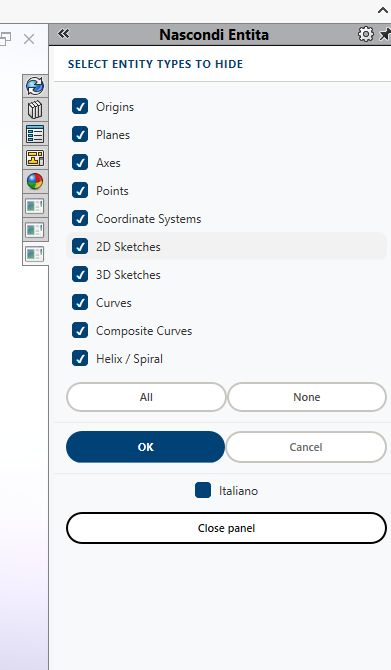
Sharing a small self-contained VBA class that adds a custom taskpane panel to SOLIDWORKS with checkboxes to bulk-hide reference geometry (origins, planes, axes, points, coordinate systems, 2D/3D sketches, curves, composite curves, helix/spiral). Works on both parts and assemblies (recursively through components), and includes a client-side EN/IT language toggle in the panel itself. No dependency on SOLIDWORKS CAM or any add-in framework - it only needs the SOLIDWORKS core Type Library and Microsoft Internet Controls, so it should drop into any SOLIDWORKS 2024 install as a standalone macro. Posting it here mainly to get some outside testing and feedback - curious if it behaves the same on other setups, especially with deeply nested assemblies or large component trees.
Environment
GestisciVisibiltà.swp (120,5 KB)
- SOLIDWORKS version: SOLIDWORKS 2024
- API surface: Desktop API (SldWorks core only, no CAMWorksLib dependency)
- Language and runtime: VBA
- Add-in, macro, or standalone app: Standalone macro (creates and destroys its own SldWorks.TaskpaneView, no add-in registration needed)
Actual Behavior
Tested on SOLIDWORKS 2024 with both a single part and a multi-level assembly: the panel opens as an embedded WebBrowser taskpane, all checkboxes toggle correctly, “All”/“None” work, the mask is passed back to VBA via a custom cadcam:// URL scheme intercepted in BeforeNavigate2, and BlankRefGeom/BlankSketch hide the selected feature types across the whole component tree. The EN/IT toggle switches all labels instantly, purely client-side. Would appreciate feedback on: - behavior on SOLIDWORKS versions other than 2024 - performance on assemblies with a very large number of components - whether swVisibilityStateShown/swVisibilityStateUnknown cover all the visibility states you’d expect in your own models

Exactly, this solution lets you do some incredible things. I've actually been using it to quickly manage 2.5-axis CAM commands and handle toolpath post-processing.
– Fabrizio_T