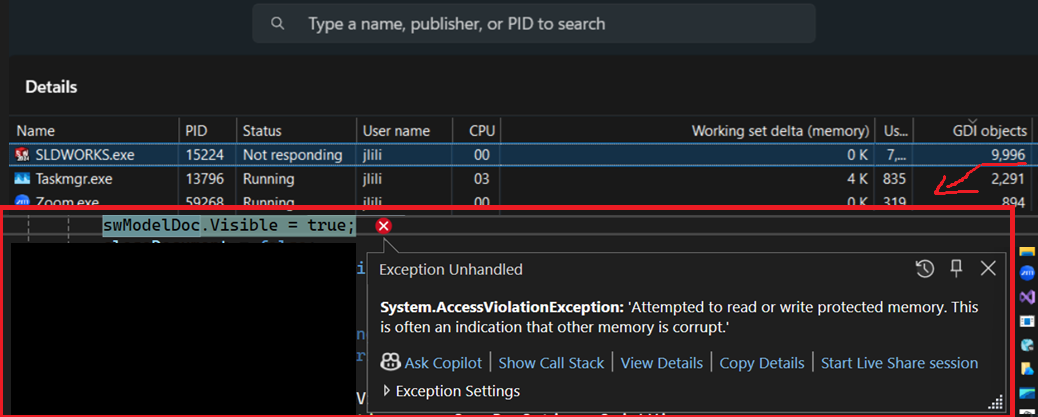
Has anyone else run into SOLIDWORKS crashing with memory access violations after long API runs where documents are opened and shown repeatedly?
One thing I discovered is that the issue is not always RAM usage. In many cases, it is GDI object exhaustion combined with unreleased COM objects.
For example, if you repeatedly do things like:
Open documents
Make documents visible
Activate windows
Create bitmaps / preview images
Switch between drawings, parts, and assemblies
Leave COM references alive for ModelDoc2, Feature, Component2, View, Face2, etc.
SOLIDWORKS can slowly accumulate GDI objects until it eventually crashes with an access violation.
I noticed this especially when doing large batch operations with hundreds or thousands of files where documents are opened visibly instead of silently.
A few things that helped:
Always close documents immediately after processing
Release COM objects aggressively with Marshal.ReleaseComObject
Set COM references to null afterward
Dispose Bitmap, Graphics, Font, Pen, Brush, and Image objects
Two of my projects suffer from this and I’d love to have some control over it, so we could work together on this. I am currently trying to fix both projects because memory use reaches 100% and solidworks crashes.
SolidDNA releases its COM objects but I don’t know how effective or complete it is at that. So I could use better tooling for better understanding. Calling GC seems like a no-go in a library, but I can try that in the consuming projects. I’ll try that this week.
Your try-finally example does not compile because model is undefined in the finally clause.
I’m trying this in project 1. I’m calling GC.Collect + wait + collect after each subproject, after closing all solidworks files. This clears up 25MB of memory and zero GDI handles. For every subproject, memory increases 200-700MB and GDI handle count increases by just 5-10. So in this project, memory is the issue and this does not significantly improve by calling the garbage collector. I’ll try to diagnose where the memory comes from. This is in SW2026.
The first time I ran this test, I got all kinds of weird unrelated errors. The second attempt is going better, with no changes in between.
Definitely missed the catch block there, haha. If there is a project, you’d like to take a look at, I’m super down.
I have had this with a project. In some cases I was able to solve it by using [HandleProcessCorruptedStateExceptions]. Maybe not the neatest solution, but it worked for me.
I even noticed that if it didn’t work, I had to retry and it would work fine:
For one function (getting feature information), it kept coming back, so I decided to run a SolidWorks macro to collect the data in a text file and read it from there. After that I didn’t get the exception anymore.
Definitely missed the catch block there, haha. If there is a project, you’d like to take a look at, I’m super down.
– AmenJlili