Hello, everyone. I’m developing a Solidworks PDM 2022 Task Add-In, but I’ve run into an error that is preventing me from testing or implementing any tasks. When I try to add a task, modify a task, or run a task from the PDM Admin Interface, I get the following error:
I have removed ALL PDM Add-Ins since this error began to appear, but it persists anyway. I’m fairly new to this, so I apologize if there’s an obvious solution or additional information I’m leaving out.
2 Answers
2
There are several reasons why this could happen.
Most likely, the process running your add-in is operating at a different UAC level than PDM. For example, avoid running the Administration Tool or Explorer as Administrator.
Also, it looks like your add-in doesn’t have a name, which can cause issues — especially with how it appears in the dialog box.
Without more details, it’s difficult to provide specific help. Feel free to share more context and I’ll take a closer look.
Following a reinstall that did not fix the issue, I was able to determine that the problem is local to my machine. I nuked PDM from orbit, uninstalling it and deleting all PDM related files in Appdata and PDM related registry entries. Restarted my computer and reinstalled PDM, and now it seems to be working!
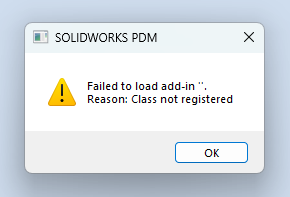
Thanks for answering. Spent the better part of yesterday afternoon looking deeper into this issue, so I can definitely share more info. My add-in does have a name, which is the confusing part, as I can't figure out what nameless add-in it's attempting to load. The pop-up appears when interacting with anything in the tasks and add-ins tabs in PDM Admin, even when all add-ins are removed (in both the admin tool AND the registry).
– ejone129In addition, if I dismiss the add-in and try to run a task anyway, it fails with the following error: System.ArgumentException: The parameter is incorrect. (Exception from HRESULT: 0x80070057 (E_INVALIDARG)) I have tried copying an example tasks add-in DIRECTLY from the Solidworks API Documentation (only changing necessary parts, such as the GUID), and the task still fails with the same error, so I'm certain that the code itself is not the problem. I already reinstalled PDM entirely too, to no avail.
– ejone129Other info that could be important; The issue occurs only for one vault on the server and only on my machine, so it's something client side, not server side, but still something only effecting one vault. Since it persisted through a reinstall of PDM, I'm assuming there's a folder somewhere that's holding onto the corrupted data which I have to delete.
– ejone129