Hi
I am new here and found that site is amazing in VBA SW scripting
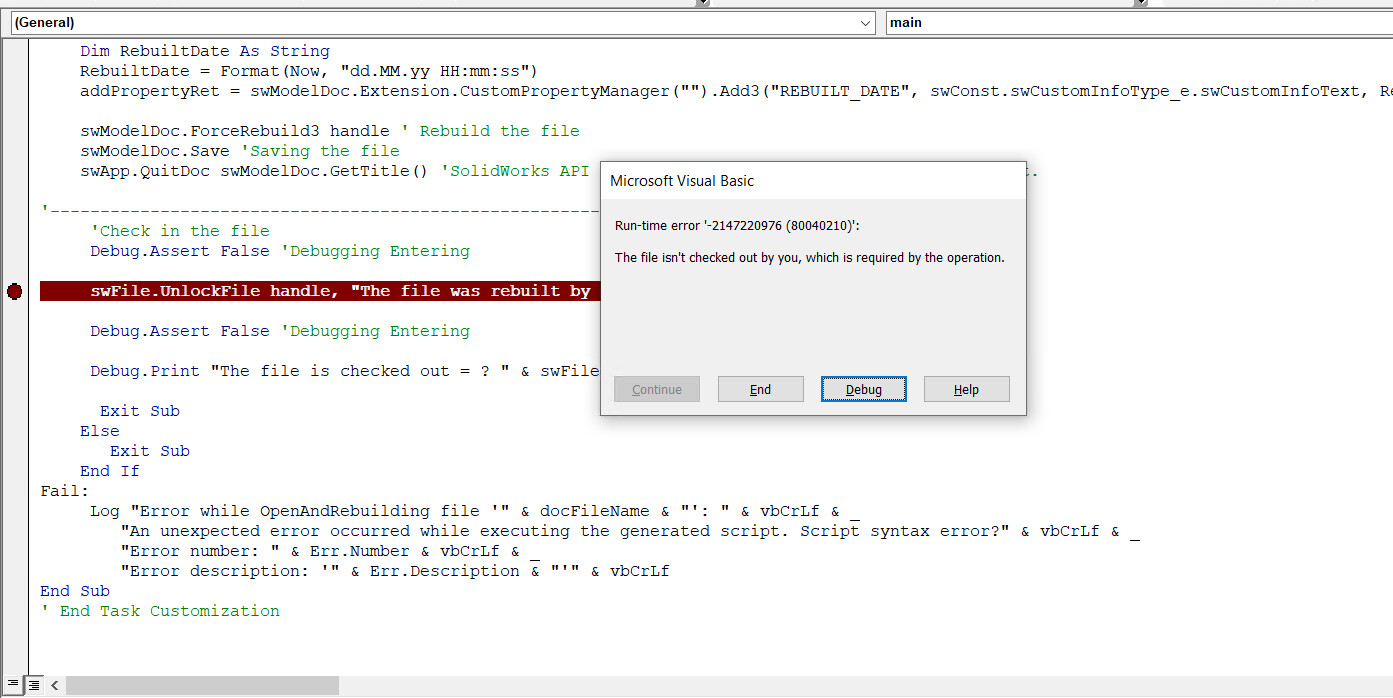
I am codding now TASK for Force Rebuild ASSY and DRW and almost finished and almost working, BUT, I cannot make the Check It . There is error and I don’t understand the mismatch
Woud be great to have some help
Here the code
Спойлер
Dim swApp As SldWorks.SldWorks
Dim swModelDoc As ModelDoc2
Dim edmVault As EdmVault5
Dim swUserMgr As IEdmUserMgr5
Dim handle As Long
Dim swFrame As Frame
Dim swFile As IEdmFile5
Dim swFolder As IEdmFolder5
Dim swDocSpecification As SldWorks.DocumentSpecification
Dim errors As Long
Dim warnings As Long
Dim FileSystemObj As Object
Dim swModExt As SldWorks.ModelDocExtension
#If VBA7 Then
Private Declare PtrSafe Function GetLongPathName Lib “kernel32” Alias “GetLongPathNameA” (ByVal lpszShortPath As String, ByVal lpszLongPath As String, ByVal cchBuffer As Long) As Long
Private Declare PtrSafe Function LoadLibrary Lib “kernel32” Alias “LoadLibraryA” (ByVal lpLibFileName As String) As Long
Private Declare PtrSafe Function GetProcAddress Lib “kernel32” (ByVal hModule As Long, ByVal lpProcName As String) As Long
Private Declare PtrSafe Function FreeLibrary Lib “kernel32” (ByVal hLibModule As Long) As Long
Private Declare PtrSafe Function GetTempPath Lib “kernel32” Alias “GetTempPathA” (ByVal nBufferLength As Long, ByVal lpBuffer As String) As Long
#Else
Private Declare Function GetLongPathName Lib “kernel32” Alias “GetLongPathNameA” (ByVal lpszShortPath As String, ByVal lpszLongPath As String, ByVal cchBuffer As Long) As Long
Private Declare Function LoadLibrary Lib “kernel32” Alias “LoadLibraryA” (ByVal lpLibFileName As String) As Long
Private Declare Function GetProcAddress Lib “kernel32” (ByVal hModule As Long, ByVal lpProcName As String) As Long
Private Declare Function FreeLibrary Lib “kernel32” (ByVal hLibModule As Long) As Long
Private Declare Function GetTempPath Lib “kernel32” Alias “GetTempPathA” (ByVal nBufferLength As Long, ByVal lpBuffer As String) As Long
#End If
Sub main()
Debug.Assert False
On Error GoTo Fail:
Set FileSystemObj = CreateObject("Scripting.FileSystemObject")
docFileName = "<Filepath>"


' Get SW interface object only if the files is SLDDRW or SLDASSM
If LCase(Right(docFileName, 7)) = ".slddrw" Or LCase(Right(docFileName, 7)) = ".sldasm" Then
  Set swApp = Application.SldWorks
  swApp.Visible = False    'SPR 682792, 538578, 651998 ' SolidWorks Is visible

Set swFrame = swApp.Frame
handle = swFrame.GetHWnd
         Debug.Print "The handle value ? " & handle

Set edmVault = New EdmVault5

edmVault.LoginAuto "Vault Name", handle ' Logging to Vault by automatically Windows Credential

Set swUserMgr = edmVault
         Debug.Print "Are we logged into? " & edmVault.IsLoggedIn
         Debug.Print "The Connected User: " & swUserMgr.GetLoggedInUser().Name

Set swFile = edmVault.GetFileFromPath(docFileName, swFolder)
         Debug.Print "The file is? " & swFile.Name

'Check Out the file
If swFile.IsLocked = False Then
 swFile.LockFile swFolder.ID, handle ' Check out the file
End If
        Debug.Print "The file is checked out = ? " & swFile.IsLocked
        Debug.Print "The file is locked by ? " & swFile.LockedByUser.Name
'Open and Rebuid the file-------------------------------------------------------------------
 ' Determine type of SolidWorks file based on file extension
   If LCase(Right(docFileName, 7)) = ".sldprt" Or LCase(Right(docFileName, 4)) = ".prt" Then
    docType = swDocPART
   ElseIf LCase(Right(docFileName, 7)) = ".sldasm" Or LCase(Right(docFileName, 4)) = ".asm" Then
    docType = swDocASSEMBLY
   ElseIf LCase(Right(docFileName, 7)) = ".slddrw" Or LCase(Right(docFileName, 4)) = ".drw" Then
    docType = swDocDRAWING
   Else
    docType = swDocNONE
   End If

   If docType = swDocNONE Then
    Set swModelDoc = swApp.LoadFile4(docFileName, "", Nothing, errors)
        docType = swModel.GetType
    End If

  swApp.LoadAddIn ("C:\Program Files\SOLIDWORKS PDM\PDMSW.dll") 'Load a SolidWorks add-in DLL manually:
Set swDocSpecification = swApp.GetOpenDocSpec(docFileName)
    swDocSpecification.DocumentType = docType
    swDocSpecification.ReadOnly = False
    swDocSpecification.Silent = True
    swDocSpecification.ConfigurationName = ""
    swDocSpecification.DisplayState = ""
    swDocSpecification.IgnoreHiddenComponents = True 'SPR 682792, 538578, 651998
Set swApp = GetObject(, "SldWorks.Application") ' Connecting to SolidWorks
Set swModelDoc = swApp.OpenDoc7(swDocSpecification)

errors = swDocSpecification.Error
        'Debug.Assert False 'Debugging Entering

If errors = swFutureVersion Then
    Log "Document '" & docFileName & "' is future version."
    Exit Sub
End If

' Load failed?
If swModelDoc Is Nothing Then
    Log "Method call SldWorks::OpenDoc6 for document '" & docFileName & "' failed. Error code " & errors & " returned."
    Exit Sub
End If


Dim addPropertyRet As Long
addPropertyRet = swModelDoc.Extension.CustomPropertyManager("").Add3("REBUILT", swConst.swCustomInfoType_e.swCustomInfoText, "File Was Rebuilt by Task Script Automatically", swConst.swCustomPropertyAddOption_e.swCustomPropertyDeleteAndAdd)
Dim RebuiltDate As String
RebuiltDate = Format(Now, "dd.MM.yy HH:mm:ss")
addPropertyRet = swModelDoc.Extension.CustomPropertyManager("").Add3("REBUILT_DATE", swConst.swCustomInfoType_e.swCustomInfoText, RebuiltDate, swConst.swCustomPropertyAddOption_e.swCustomPropertyDeleteAndAdd)

swModelDoc.ForceRebuild3 handle ' Rebuild the file
swModelDoc.Save 'Saving the file
swApp.QuitDoc swModelDoc.GetTitle() 'SolidWorks API call to close the currently opened document.
'---------------------------------------------------------------------------------------------
'Check in the file
Debug.Assert False 'Debugging Entering
 swFile.UnlockFile handle, "The file was rebuilt by SW script. Was checked-in Automatically!"

 Debug.Assert False 'Debugging Entering

 Debug.Print "The file is checked out = ? " & swFile.IsLocked

  Exit Sub
Else
   Exit Sub
End If
Fail:
Log “Error while OpenAndRebuilding file '” & docFileName & “‘: " & vbCrLf & _
“An unexpected error occurred while executing the generated script. Script syntax error?” & vbCrLf & _
"Error number: " & Err.Number & vbCrLf & _
“Error description: '” & Err.Description & "’” & vbCrLf
End Sub
’ End Task Customization