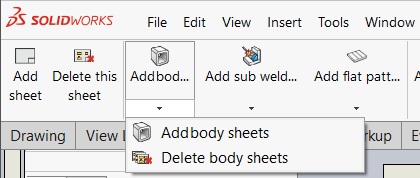
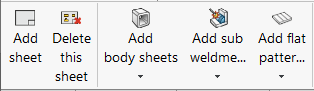
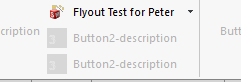
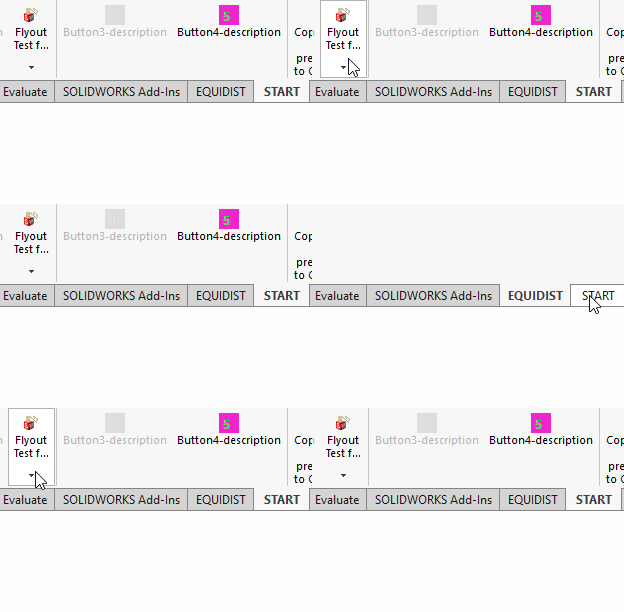
Does anybody else have this problem? When I create a toolbar with flyouts, the flyout text is not fully visible until you click on that item, change to a different toolbar and come back.
Drew toolbar right after loading solidworks. Note that the third button says “Add bo…”
I’m using an addin without soliddna for testing: it get the button with truncated text. when i go to another tab and come back, it is still truncated,.. SolidWorks keeps moving in mysterious ways…
if you only have 2 or 3 options, I would prefer to put them one below the other. it makes the UI easier to navigate.
or
keep the text short < 7 tokens
or
use swCommandTabButton_TextHorizontal : it shows the complete text in that case. as a bonus you can fill the space below it for other buttons…
Can you share a video or a couple of screenshots of your results? Can also be in private. For me, it expands after clicking the flyout the first time and going back and forth between tabs.
SolidDNA adds the items to the flyout on the first click because it didn’t work otherwise. Do you see that same behavior?
Flyouts are full of bugs, I’ve reported another one last year regarding disabling/hiding buttons when you use callbacks to determine the state. Three of the five enum values showed different behavior than documented.
Great, thank you. Too bad it doesn’t expand at all. Which solidworks version is this?
My own PC crashes when I open a flyout and switch tabs, but only for SW2024 and older. I thought I botched a Drew update, but it’s also in previous Drew versions
When do you add the flyout items? In my testing, it doesn’t work when we add items during startup when we create the menu, only after clicking the flyout for the first time.
I got a reply from solidworks, it’s a bug that only occurs on large screens. That explains why I’m only noticing it now, after I bought a big ass monitor.
After thorough verification and testing, we can confirm that the issue you reported is reproducible when using 4K or 5K monitors with SW 2026 SP2.1 on a custom toolbar, but not on default toolbars. However, this behavior was not observed with Full HD (1080p) monitors, even with a custom toolbar.
Given these findings, I’m escalating this service request to our second-level support team for further evaluation. Our development team will be engaged as needed to ensure a resolution.
I also found a related bug that crashes solidworks when you switch command manager tabs. But that issue only occurs on SW2024 and older.