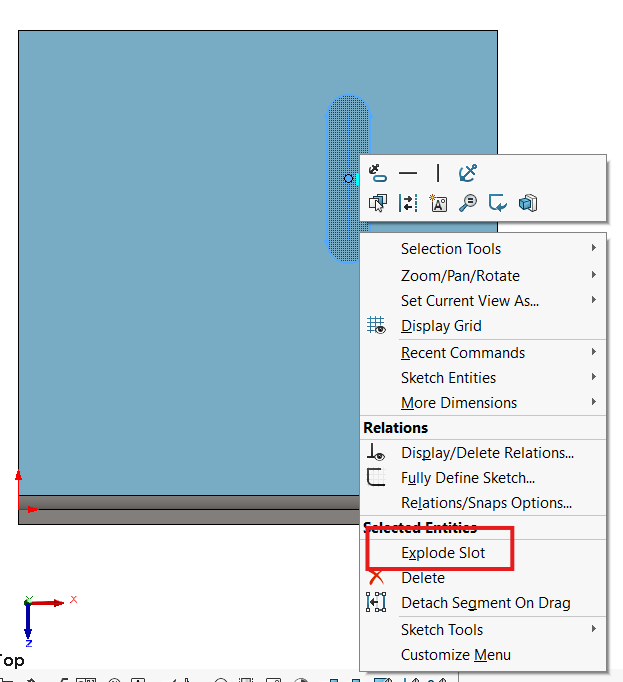
Do you know if there is an API command for “explode slot” ? I need to break down the slot geometry into individual lines and arcs…
2 Answers
2Hi Marcel,
First of all, i would like to hear a little more about your context. I suppose this is for existing solidworks files? What problem do you have with those? If it is for new files there are ways to make slots the old fashion way by drawing a line and offset bi-directional with caps set to arc
Anyway here is how i would tackle this:
The API shows there is no explode Slot method for SketchSlot, so we need to think out of the box.
I tested with the “Split entities” manually and this looked very promising because i could use split entities by selecting the centerpoint coordinates.
Since SketchSlot has a method “GetCenterPoint” we could easily get those.
I used help examples:
- Split Open Sketch Segment Example (VBA)
- Get Sketch Slot Data (VBA)
to make the following quick and dirty working example:
Option Explicit

Dim swApp As SldWorks.SldWorks
Dim swPart As SldWorks.PartDoc
Dim longstatus As Long, longwarnings As Long
Dim swSketchMgr As SldWorks.SketchManager
Dim swSketch As SldWorks.Sketch
Dim iSlotCount As Integer
Dim vSketchSlots As Variant
Dim vSketchSlot As Variant
Dim swSketchSlot As SldWorks.SketchSlot
Dim swFeature As SldWorks.Feature
Dim swMathPoint As SldWorks.MathPoint
Dim vArray As Variant
Dim swSketchPoint As SldWorks.SketchPoint
Dim vSketchPtID As Variant

Sub main()

    Set swApp = Application.SldWorks
    Set swPart = swApp.OpenDoc6("C:\Part1.SLDPRT", swDocPART, swOpenDocOptions_Silent, "", longstatus, longwarnings)

    Set swFeature = swPart.FeatureByName("Sketch1")

    swFeature.Select2 False, 0
    swPart.EditSketch

    Set swSketchMgr = swPart.SketchManager
    Set swSketch = swFeature.GetSpecificFeature2()

    iSlotCount = swSketch.GetSketchSlotCount
    Debug.Print "Number of slots: " & iSlotCount
    Debug.Print " "

    vSketchSlots = swSketch.GetSketchSlots
    For Each vSketchSlot In vSketchSlots
        Set swSketchSlot = vSketchSlot
        Debug.Print "Length: " & swSketchSlot.Length
        Debug.Print "Width: " & swSketchSlot.Width
        Debug.Print "LengthType: " & swSketchSlot.LengthType

        Set swMathPoint = swSketchSlot.GetCenterPoint
        vArray = swMathPoint.ArrayData
        Debug.Print "CenterPoint (x,y,z): " & vArray(0) & "," & vArray(1) & "," & vArray(2)

        swSketchMgr.SplitOpenSegment vArray(0), vArray(1), vArray(2)
    Next

    swPart.SketchManager.InsertSketch True

End Sub
Let us know how it goes.
Eddy
Hey Eddy, thanks for your response.
To give you a bit of context: A customer has existing sketches (slots, rectangles, etc.) that need to be broken open if they are closed. That means he wants to open the contours because he wants to use them for engraving. I have an existing algorithm that reads out the longest line from all possible elements, selects it, deletes it, and creates two new lines. With the slots, it happened that when I selected a line of a slot to break it, the entire slot was deleted. Therefore, the question was whether there was a possibility to “explode” via API.
Thanks for your code - I’ll test it and see if I can use it 
This would be my guess but I’m unable to test: https://help.solidworks.com/2022/english/api/draftsightapi/Interop.dsAutomation~Interop.dsAutomation.ISketchManager~ExplodeEntities.html
– BigCrazyAlunfortunately it's for DraftSight - I would need it for Solidworks
– Marcel